

-
-
-
The My Account section gives you quick and easy access to important account information and helpful features. From one convenient location, you can:
- * Access customer service information
- * View the status of your most recent orders
- * Review your complete order history
- * View recent invoices
- * Review orders pending approval
- * Track recent deliveries
- * Access and manage your personal wish lists
- * Use Quick Order for faster ordering
- * Update your password and account information in My Profile
-
To access your account, please log in using your email address as your username.
My Account Page:
Once logged in, Users will be on the My Account page, which provides an overview of all account activities.
Under the "My Account" section, you will find the following information:
- Email (username) used to log in.
- Company Name and Company ID.
- My Profile Tab that allows you to change your password.
- Customer Service will list your sales representative and email address, phone number, email address, and physical address for Customer Service.
- Recent Invoices to view the details of your last two orders. By clicking on the invoice ID, you can access more information.
.png?width=670&height=498&name=Screenshot%20(971).png)
- Click below to view a video on my account.
-
Reset Password
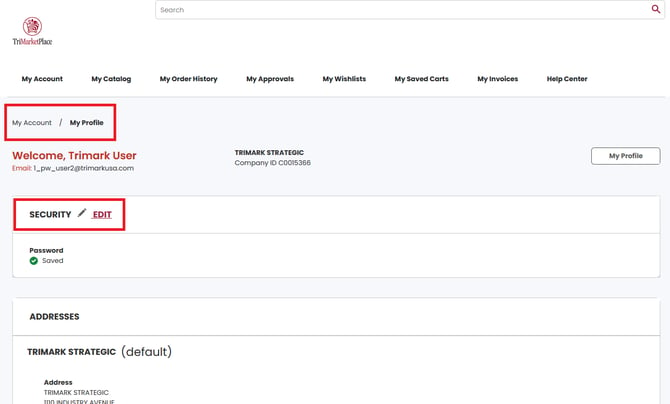
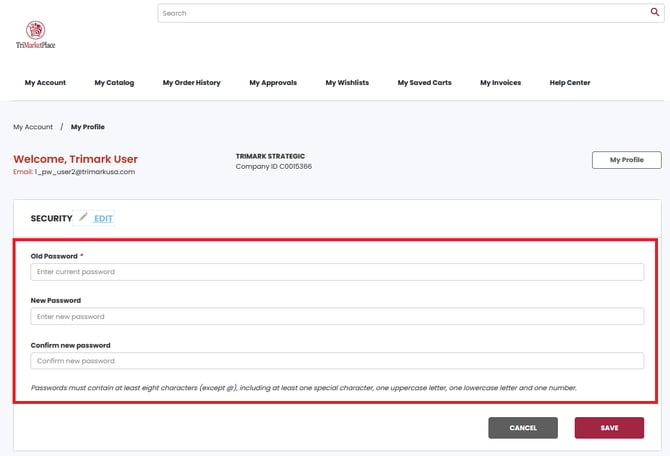
To reset your password, go to My Account and select My Profile. Click on the Security EDIT link, and follow the instructions to update your password. Your new password must meet the following requirements: Passwords must contain at least eight characters (except @), including at least one special character, one uppercase letter, one lowercase letter and one number.
Click below to view a video.
-